01
PNG to JPG
Choose JPG when the picture has to open on a website, a Windows PC, or a form. JPG is smaller and lossy, and transparent areas are flattened. One file to one JPG is free.
Change one photo or an unlocked PDF to PNG, JPG, HEIC, TIFF, BMP, PDF, WebP, a still GIF, or ICO.
Last updated
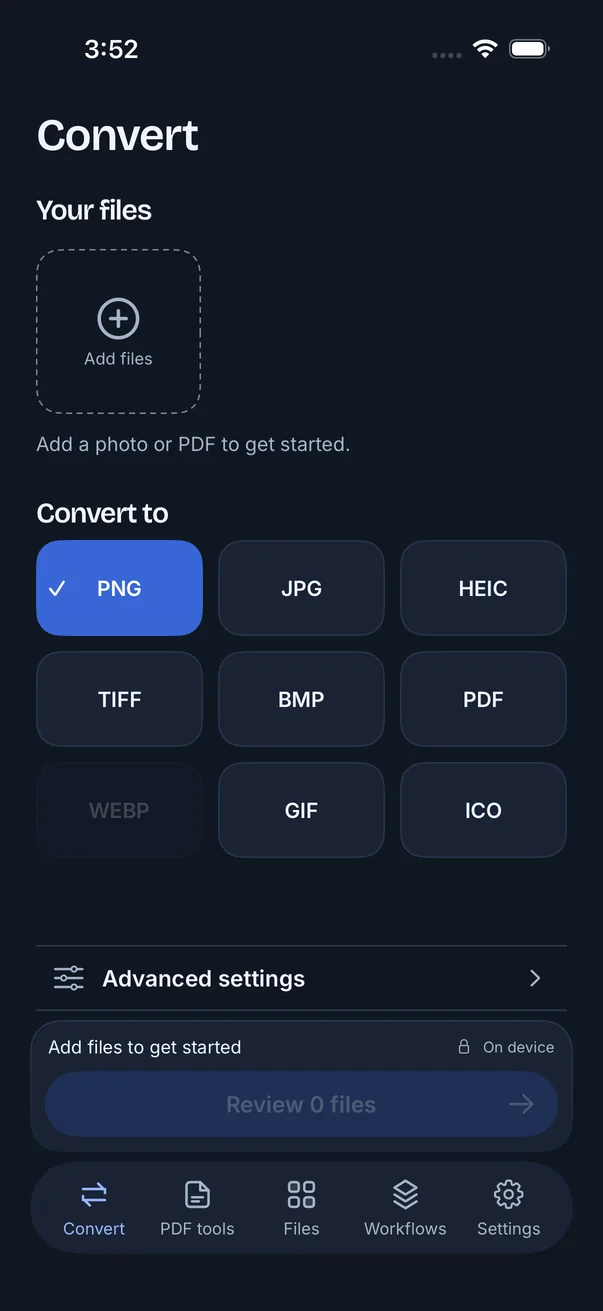
One file to one format is free, and you do not need an account. Add a JPG, PNG, HEIC, TIFF, BMP or unlocked PDF from Photos or Files. On a supported device you can also scan a document. The capture shows the Convert screen before a file is added.
Open FileSway and add one file from Photos or Files.
Choose one format in the grid: PNG, JPG, HEIC, TIFF, BMP, PDF, WebP, GIF or ICO. One file to one format is free.
Open Advanced settings for a size limit in KB or MB, a width and height in pixels, or to remove location or broader supported metadata. Supported metadata stays unless you remove it.
Review the file. If you set a limit, FileSway makes the file smaller only as needed. Your original stays unchanged.
Save to Photos, save to Files, share, or export a ZIP.
The Convert tab is a 3 by 3 grid. These notes are from FileSway. Common inputs include JPG, PNG, HEIC, TIFF, BMP and unlocked PDFs. Output availability depends on what your iPhone can encode.
| Feature | Good for | Limit |
|---|---|---|
| PNG | Images with transparency | Lossless encoding of the rendered pixels. It cannot restore detail the source already lost. |
| JPG | Widely compatible photos | Smaller, lossy files. Transparent areas are flattened. |
| HEIC | Compact modern photos | Uses your iPhone's encoder. Lossy, and transparency is flattened. |
| TIFF | Still-image interchange | Rendered pixels. Original TIFF layers and structures are not kept. |
| BMP | Bitmap compatibility | Files can be large, and transparency is flattened. |
| Images as documents | Turns images into a PDF. Page editing lives in the PDF tools tab. | |
| WebPDevice dependent | Web-oriented images | Available when your iPhone has a WebP encoder. |
| GIF | A still GIF image | One frame, up to 256 colors. It is not an animation. |
| ICO | Small icon files | One icon, up to 256 pixels. |
One file to one format is free. Several files, or several formats in one job, need FileSway Pro. A photo saved as a document is Photo to PDF. Pages of an unlocked PDF saved as pictures are PDF to JPG.
Good to know
Choose JPG when the picture has to open on a website, a Windows PC, or a form. JPG is smaller and lossy, and transparent areas are flattened. One file to one JPG is free.
Choose PNG when the image needs transparency. PNG keeps transparency and encodes the rendered pixels without the lossy step JPG uses. It cannot restore detail the source already lost. A JPG has already flattened transparency, so there is none left to keep. One file to PNG is free.
WebP in FileSway is an output, and only when your iPhone has a WebP encoder. The inputs are JPG, PNG, HEIC, TIFF, BMP and unlocked PDFs. WebP is not one of those inputs. From a file FileSway can open, choose JPG for a widely compatible photo. Transparent areas are flattened.
ICO output is one icon, up to 256 pixels, in a single size. One file to ICO is free. For a still image with more colors, use PNG or JPG. GIF output is one frame, up to 256 colors, and it is not an animation.
You can change photos you have not taken yet without FileSway. Converting a file already on the iPhone is the part the camera setting does not do. Apple may move these menus.
Open Settings.
Tap Camera, then Formats.
Choose Most Compatible.
New camera photos are saved as JPG. Photos already on the iPhone stay as they are. HEIC to JPG covers that path.
From Photos, some share destinations ask for a format before they take the file. What arrives depends on the iOS version and the app you share to. Shortcuts can convert images on some iOS versions, when the action is available and you build the shortcut. A shortcut can omit a size limit or an ICO.
Free & Pro
| Feature | Built-in iOS | FileSway Free | FileSway Pro |
|---|---|---|---|
| One file to PNG, JPG, HEIC, TIFF, BMP, PDF, GIF or ICO | Only if Share or Shortcuts offers it | ||
| WebP outputDevice dependent | Only if that iOS version offers it | When your iPhone has a WebP encoder | When your iPhone has a WebP encoder |
| Animated GIFGIF output is one frame, up to 256 colors. It is not an animation. | Depends on the destination | ||
| Several files in one job | No Photos control for a batch | ||
| More than one format per job | Depends on the destination | ||
| Size limit in the same stepPresets run from 100 KB to 50 MB, or a custom KB or MB size. | Not part of Most Compatible | ||
| Price | Included with iPhone | Free | $14.99 once |
Document processing does not upload your files to our servers.
Image conversion runs on your iPhone. Cloud file providers, Apple purchases and restore, and links you choose to open can still use the internet.
On-device privacyAdd the photo in FileSway from Photos or Files, choose one format, then review and save or share. One file to one format is free, and the original stays unchanged.
Pick the new format in FileSway, such as JPG, PNG, HEIC, TIFF, BMP, PDF, WebP, GIF or ICO. One file to one format is free, and several formats from one job need FileSway Pro.
FileSway can write WebP only when your iPhone has a WebP encoder, and WebP is not an input. FileSway opens JPG, PNG, HEIC, TIFF, BMP and unlocked PDFs, so choose JPG from one of those if you need a JPG.
No. PNG is a lossless encoding of the rendered pixels, and it cannot restore detail the source already lost. Use PNG when you need transparency, because a JPG source has already flattened transparent areas.
No. GIF output is one frame, up to 256 colors, and it is not an animation.
You can add JPG, PNG, HEIC, TIFF, BMP and unlocked PDFs from Photos or Files. On a supported device you can also scan a document. Several files, or several formats in one job, need FileSway Pro, a one-time $14.99 purchase in the U.S., and there is no subscription.

FileSway is coming to the App Store. Convert, resize & compress photos and PDFs, right on your iPhone.