Smaller only as needed. Your original stays unchanged.
Quick answer
Last updated
On iPhone, FileSway compresses an image to a KB or MB limit you type, or to a preset from 100 KB to 50 MB.
One photo to one format is free, FileSway makes the file smaller only as needed, and your original stays unchanged.
Pixel dimensions change only if you allow a resize, and FileSway shows the finished size before you save.
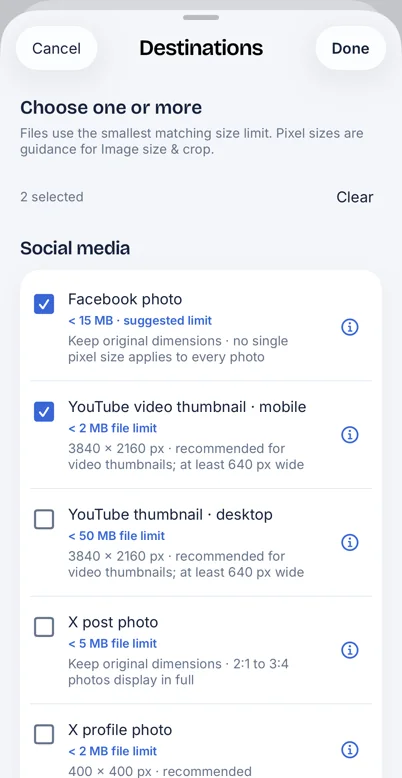
When several destination presets are checked, FileSway uses the smallest matching limit.
File size is one rule on an upload form, so also check the format and the pixel size it asks for.
Several photos in one job need FileSway Pro, a one-time $14.99 purchase in the U.S., with no subscription.
Set a limit from 100 KB to 50 MB
This is the same limit control as on the FileSway home page. The readout is the target you picked, not a finished photo. Presets span 100 KB to 50 MB, or type your own. When several destination presets are checked, the smallest matching limit is used. The names and limits are the ones in FileSway. Check the form’s current rule before you post.
Size limit for this file
Smallest match: YouTube video thumbnail · mobile
100 KB500 KB1 MB2 MB5 MB15 MB50 MB
Preset names and limits as shown in FileSway. Platforms change their rules, so check the destination before you post.
What to pick: 100 KB, 200 KB, 1 MB, 2 MB and 5 MB
Find the number on the upload form, in the error it shows, or in that site’s current help. Use the figure stated there. A remembered limit, or a preset in FileSway, can be out of date.
Then set that number as a preset from 100 KB to 50 MB, or as a custom KB or MB value. People look up 100 KB, 200 KB, 1 MB, 2 MB and 5 MB. The scale also marks 500 KB, 15 MB and 50 MB. None of these is a claim about what a website allows. File size is one rule, so also check format and pixel size. Resize an image when the form wants pixels. Convert HEIC to JPG when it will not take HEIC.
What to pick in FileSway. Not a list of what any website allows. 1 MB = 1,000 KB.
Feature
What to pick in FileSway
100 KB
Type 100 KB. That is the low end of the presets.
200 KB
Custom value. Type 200 KB. It is not a mark on the scale.
500 KB
Type 500 KB. It is a mark on the preset scale.
1 MB
Type 1 MB. In FileSway, 1 MB = 1,000 KB.
2 MB
Type 2 MB, or choose a destination preset at 2 MB.
5 MB
Type 5 MB, or choose a destination preset at 5 MB.
15 MB
Type 15 MB, or choose a destination preset at 15 MB.
50 MB
Type 50 MB. That is the top of the preset range.
Set a custom limit
One photo to one format is free, and you do not need an account. Set a limit and FileSway makes the file smaller only as needed. Your original stays unchanged.
01
Open FileSway and add the photo from Photos or Files.
02
Open the size limit. Type a KB or MB value, or check one or more destination presets. Presets span 100 KB to 50 MB.
03
If more than one preset is checked, the file uses the smallest matching limit.
04
Pixel dimensions change only if you allow a resize. Review the finished size before you save.
05
Save to Photos, save to Files, or share the copy. The original in Photos is not replaced.
The same job can change the format. Compress a photo is the shorter page for one picture.
Facebook photo at 15 MB and YouTube video thumbnail, mobile, at 2 MB are checked. The sheet uses the smallest matching limit.
Good to know
01
When the limit is impossible
A very small limit can need fewer pixels, or stronger JPG compression. Pixel dimensions change only if you allow a resize. FileSway does not promise a quality level, or that every photo can hit every number.
Review the finished size before you save. If the copy is still over the limit you were given, allow a smaller width and height, or save as JPG instead of PNG. A PNG of the same picture is often larger. The original stays unchanged, so you can run the job again.
02
KB vs MB
In FileSway, 1 MB = 1,000 KB. The custom limit says so. Two megabytes is 2,000 KB. If the form says 2 MB, type 2 and choose MB, or type 2000 and choose KB. Both are the same target here.
Some counts treat 1 MB as 1,024 KB. FileSway does not. If you are unsure which count the form uses, aim a little under the stated limit and check the finished size.
03
Photo limits and PDF limits
A photo limit does not prepare a PDF. PDF tools use caps of 10, 15, 25, 35 or 50 MB, or a custom size, and can split one PDF into numbered parts if needed. Compress a PDF on iPhone. Compressing or splitting a PDF can affect forms, links and signatures.
Without an app
Photos has no field for a target file size. In recent iOS versions, Mail may offer a smaller size when you attach a photo. That choice applies to the message. Apple may move these menus.
01
Open Mail and start a message.
02
Attach the photo.
03
If iOS asks for a size, pick a smaller one. If it does not ask, Mail did not offer a choice.
04
Send the message. The photo in Photos is still the original.
01
When an app is better
You were given a maximum in KB or MB, such as 100 KB, 200 KB, 1 MB, 2 MB or 5 MB.
You need the smaller file saved, not only attached to one message.
You want to review the finished size, and leave the original as it is.
You want many photos in one job. That batch is FileSway Pro.
Add the photo in FileSway, type 2 MB or pick a destination preset at 2 MB, then review the finished size and save the copy. One photo is free, FileSway makes the file smaller only as needed, and your original stays unchanged.
How do I make a photo less than 1MB on iPhone?
Type 1 MB in FileSway, or type 1000 KB, because FileSway uses 1 MB = 1,000 KB. One photo is free. Review the finished size before you save, and your original stays unchanged.
How do I make a JPG less than 100KB?
Type 100 KB and choose JPG. That is the low end of the presets, and a limit that small may need fewer pixels, which change only if you allow a resize. FileSway does not promise every photo can reach 100 KB, or how the copy will look.
Why won’t the form accept my photo even under the limit?
File size is only one rule, and the form may also require a format, such as JPG, or a width and height. Check its current requirements, because a copy under the limit you set can still be rejected. The limit is not a promise that the destination will accept the photo.
Does a smaller file look worse?
It can. A tight limit re-encodes the photo, and JPG is lossy, so detail can drop, and fewer pixels drop more if you allow a resize. The original in Photos is not rewritten, and FileSway does not promise a quality level.
Is 1 MB the same as 1,000 KB in FileSway?
Yes. FileSway uses 1 MB = 1,000 KB, so type 1 and choose MB, or type 1000 and choose KB. Some other counts treat 1 MB as 1,024 KB, so if the form might use that count, aim a little under its stated limit and check the finished size.
How do I get a PDF under a size limit?
PDF caps are separate: 10, 15, 25, 35 or 50 MB, or a custom size, and a photo preset does not compress a PDF. If one file can’t fit, a PDF can be split into numbered parts. Compressing or splitting can affect forms, links and signatures.
 FileSway